Yves here. As readers know, my strong preference is for devices that are as dumb as possible so as to reduce spying attack surface and feature bloat. My laser printer, for instance, lacks a control/readout panel. It has an on-off button and on-off lights. Perfect! As for Windows, if you are on a Mac, you can buy the Office suite, as opposed to license it. They do make it hard but I had to get a new version a bit over a year ago with a new laptop. You can run a non-updated version for easily 5 years if your uses are simple (IIRC my last one was fine for 10 years but I imagine I won’t get that sort of life now)
I dread the day when I have to go over to Linux. I no one here to do support. I prefer plunging out toilets to having to do computer housekeeping. With toilets, task completion can only take so long and then it is only a tiny bit more time before you have the bathroom all cleaned up. No such certainty with computers.
By Thomas Neuburger. Originally published at God’s Spies
“Citizens will be on their best behavior because we are constantly recording and reporting everything that’s going on.”
—Larry Ellison, billionaire visionary and Oracle CEO
“This is a tale about power.”
—Yours truly
This is Part 2 of a series on the licensing revolution, the move by manufacturers to sell you something that you nevertheless don’t control. Ownership becomes licensing, and control stays with them. In the first part, I wrote:
Two of the most revolutionary inventions man ever made were created in the 20th century, one at its start and the other close to the end. Both offered the same innovation: a quantum advance in individual freedom and power.
I’m talking, of course, about the automobile, personal transportation, and the PC, your own personal computer.
Neither is now yours. The fate of the automobile is described at the link above. The fate of the once-personal computer is described below.
The Personal Computer and the ‘Personal’ Computer: Renting Back What You Own
This is a tale about power.
Before the PC and its business equivalent, the UNIX-based Sun Workstation, access to computing power was through IBM-style mainframes and minicomputers, like those made by DEC. None of these could be considered “personal”; they were too costly, and though they could accommodate multiple users at terminals, the computing itself was central and corporate-owned. You sat in front of a terminal, while a corporate-controlled processor did the work. Nothing was yours.
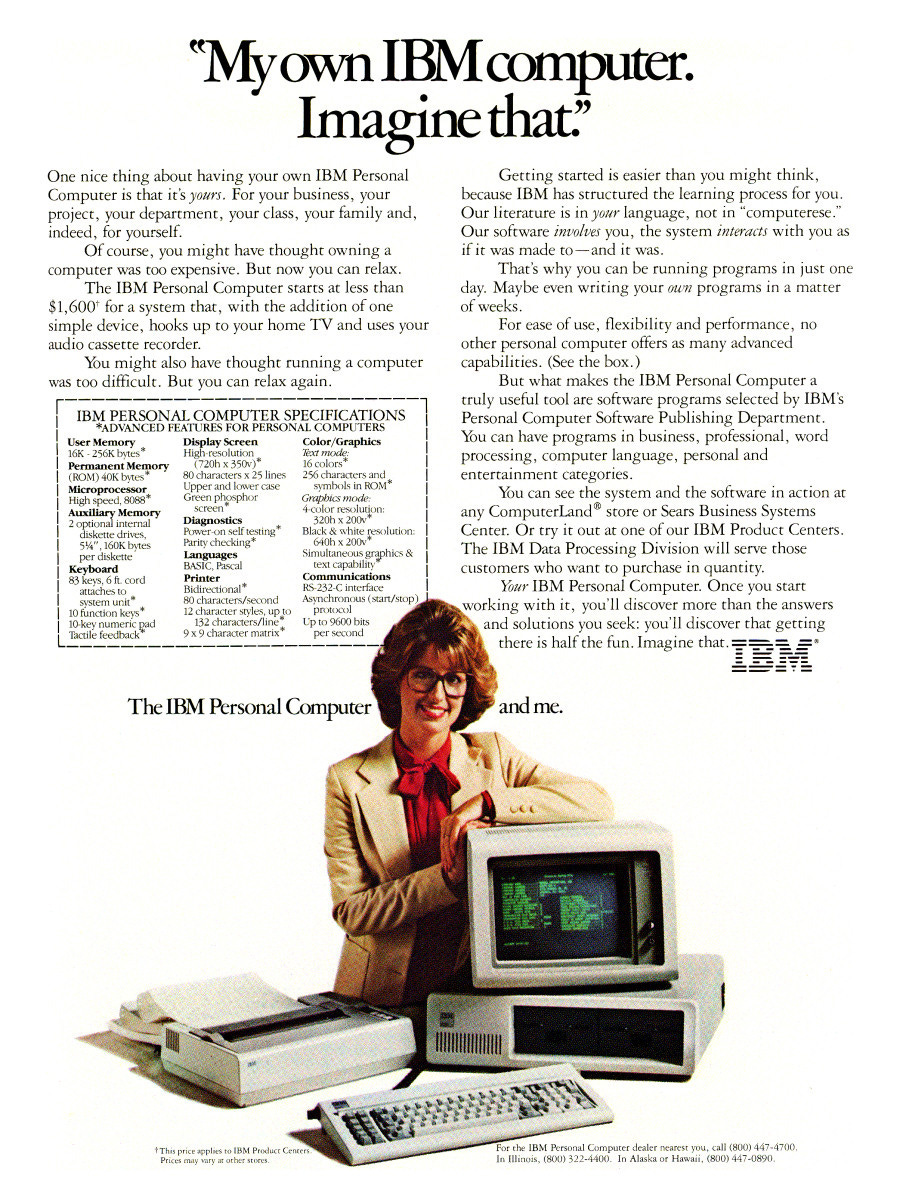
After the personal computer was created and available, the power was inside the box, which you personally owned and controlled. Check the headline and the first sentence of the advertisement below.
But today, thanks to Windows 11, that’s all been reversed. The machine is no longer yours; you only paid for it. As this writer put it:
An operating system is the most personal part of a “personal” computer, and it used to be that as a Windows user I didn’t feel like I was renting my computer from Microsoft, but in recent years that feeling has all but evaporated.
It’s not just the feeling of ownership that has evaporated; it’s also the fact.
Windows Owns Your Machine
In every sense but receipts and cash laid out, Windows owns your machine. And that’s due to get worse.
Let’s start with Windows update practices. The operating system updates itself at will, sometimes breaking your machine, and can reset your settings whenever an update occurs. Sydney Butler again, the writer quoted above:
I have lost count of the number of times that I’ve left my perfectly working Windows computer at the end of my work day, only to return to a completely broken computer that won’t boot the next morning. We have numerous articles at How-To Geek on how to stop Windows from updating, and the mere fact that readers are searching for this information should tell you something.
Forced, automatic Windows updates seem inevitable now, and with every workaround people come up with, the loopholes are closed. Updates can be delayed, but not deferred. Resistance is futile.
But it’s more than that. There’s the constant, built-in ads; the forced Microsoft Account logins; unstoppable AI everywhere; the AI-is-watching-you “feature” (called Recall); the moving of your data onto the Microsoft cloud; and, something we’ll cover more in a later piece, the dangerous TPM chip that every modern computer seems to have, which opens the door to the zero privacy hell loved by the Davos world.
As Rob Braxman puts it in this video (emphasis mine):
[1:17] Microsoft is quietly ending the era of the personal computer as we’ve known it. And [Microsoft CEO] Satya Nadella is being upfront, but he is not being understood by the average consumer.
So what people are seeing as visible issues are just the fluff. These are perceived to be important but actually only just small building blocks like Lego pieces to the entire big project.
Windows is being turned into something else entirely — an always watching, always AI-connected, cloud dependent system where your machine is no longer fully yours, even though you paid for it.
And the plan is for you to keep paying monthly for the privilege of having this AI control, but you won’t realize till later that this is no longer some progression from Windows XP. The average person isn’t really understanding this, but they are sensing the big picture. Something is afoot.
If you own a machine running Windows 11 on hardware with a TPM chip, that describes you. I could go on and on.
Recall and TPM
A couple of highlights before this gets too long. I may expand on these later.
- Microsoft Recall uses AI “to take images of your active screen every few seconds.” See more from Ars Technica here.
Microsoft claims (now) that the feature protects privacy. But is that really true? What if the government comes calling, Patriot Act-style? And will it always be true? Don’t count on it. (If Recall is turned on, instructions for turning it off are here.)
- The TPM chip — In his video, Braxman says [3:19], “TPM security chip [creates] verified identities in a Microsoft account with hardware monitoring.”
TPM does a lot more, but yes, it creates unique identities saved to a hardware chip and accessible whenever requested by authorized entities.
So, can you picture a world where every computer has your identity built into the hardware itself, available on request by “authorized” entities? Larry Ellison can.
If age verification is required, even on anodyne sites, the TPM chip will be used. And Digital ID will open that door for good.
Davos Man Larry Ellison Describes the World
Billionaire and Oracle CEO — whose son now owns CBS, Warner Brothers Discovery, Paramount Plus and more — looks forward to a world of total surveillance. Chris Hedges:
Oracle founder, business associate of Elon Musk and longtime Trump donor Larry Ellison, who recently announced a $500 billion AI infrastructure plan alongside Trump, urged nations to move all of their data into “a single, unified data platform” so it can be “consumed and used” by AI models. Ellison has previously stated that an AI-based surveillance system will guarantee that “Citizens will be on their best behavior because we are constantly recording and reporting everything that’s going on.”


ORACLE = One Rich A**hole Named Larry Ellison.. I am sure that Hawaiian island is quite nice.
They have more lawyers than engineers. Try postgres if you are need of a database.
ORANLE?
Anyway, another joke is:
Q: What’s the difference between God and Larry Ellison?
A: God doesn’t think he’s Larry Ellison.
And having met him a few times, he really, really is an arsehole.
One Rich A**hole Called Larry Ellison
ORA Called Larry Ellison
He’s bet his company on OpenAI. I’m sure that’s going to end well.
For him, personally? Not worried. For the mere employees and various funds plebes hope will cushion their retirement? Very worried
Some goon on FOX News was just telling America to go by Navidia now.
L Ellison is the Toad
Somebody kissed the Toad
Princess Bari, super editor, was created
Miraculously
It is fairly trivial to bypass all of the controls imposed by MS using Powershell scripting and even systems from almost 15 years ago (read: slow undersized memory laptop or desktop) which Win 11 flags as Not Eligible can easily bypass installation and setup a fully licensed and never expiring Win 11 Pro
Same with all editions of office 2021-2024 etc
TPM chip can be completely neutered
Pointers?
Came to the comments to say the same thing. It’s just a matter of opening a command prompt during setup and tweaking a few things. Disable all the updates in the settings, etc. I have a Win11 mini PC that I use as a headless server so I must be doing something right.
For Office – plenty of standalone licenses are available for resale since the EU permits it. Otherwise, there’s this:
https://www.microsoft.com/en-us/microsoft-365/p/office-home-2024/cfq7ttc0pqvj
Right on the site, not hard to find.
I use a Mac and an iPhone principally, but also use Windows and Android and Linux for some things. For me, each has its virtues and drawbacks.
Hi Bugs,
Just wanted to let you all know that starting with Office 2021 many features require a Microsoft Account and/internet connection work.
When I upgraded from Office 2013 to ’21, the first thing I realized after install was that the majority of Templates are accessible only with an Internet connection.
Otherwise, you will be left with a selection far smaller than what I had on ’13.
Also, Autosave only functions when OneDrive is turned on, which requires an Microsoft Account!
If you need MS Office, please purchase 2019 or earlier! That’s what I had to do!
Best regards to all.
I was a MSFT user from the 1980’s until December of 2025. I tried Linux in the 1990’s and gave up after spending an entire day (unsuccessfully) trying to configure a monitor and printer. MSFT OS and associated software made things simple enough for a non-programmer to get up and running quickly – plug and play. The Windows 10 and Office 365/One Drive era was the beginning of the end for me. The constant syncing with the cloud storage and bloated software in general slowed response times and became increasingly annoying. Windows 11 was the deal breaker. With Braxman’s overall guidance I switched to Linux via the Ubuntu ‘distro’ (as each variation of Linux is called in Linux speak). Ubuntu has an easy to use graphical user interface so I never need to face the intimidating blank terminal screen waiting for me to enter the correct coding. Ubuntu is free and maintained with free updates by a company that makes its money from servicing corporate users.
The transition was not without drama, especially in configuring a dual boot set up allowing me to retain the option of using a version of W10 (so as not to violate the wing walker’s credo – never take both feet off of the wing at the same time). But I found a u-tube video explaining how to resolve every issue I encountered. Now six months into it, I never boot into W10. There is free Linux software available for everything I need to do. And it is blazingly fast compared to W10 software, even with a 5 year old computer. Plus it is completely local – no cloud and no spyware. And the transition would have been much easier if I had just gone completely to Linux without the dual boot complication.
I’m doing the same, with Ubuntu/Win10 on separate SSD’s (storage drives). I’m in the middle of legal wrangling so won’t switch to Ubuntu permanently until that’s done. Transitioning to Linux has not been as smooth as I wanted, but Braxman’s podcasts are very usefull and confidence building. Making fatal errors with critical data while transitioning to Linux can be a heartstopper. If you can afford professional assistance, get it.
Maintaining data privacy is a challenge in today’s ‘connected’ environment.
I vaguely recall Windows 98 and NT being the last of MS I’ve used, so I guess I did the transition to Linux about a quarter (or more) of a century ago.
Been trough SuSE, Gentoo, Debian and Ubuntu at home, Centos and Rocky at work. For a long time I’ve found any Windows OS to be weird, cumbersome and a productivity killer, when ever I have the misfortune of being forced to use one.
My parents use Macs (“computers for the dumb people” my 80+ year old mother says) and I can’t support them at all as I have no idea what makes them tick and there always seems to be a paywall somewhere.
This summer I hope to find time to install Tiny Core Linux with dmw on one of my old laptops (provided it still has some battery life in it). Mostly for the fun of it, but if it works out, it’s a very lightweight set-up for, say, remote work. Add vimb for browsing and neomutt (or similar) for email, and won’t even need a mouse to slow me down…
Your experience with Linux sounds quite similar to my own experiences. I started using Redhat for university in the mid 1990s and work soon after. For my personal use, I moved from Debian to Ubuntu to Gentoo to Arch. Thus, in terms of Linux, I might be the most hardcore here on today’s thread—unless, of course, there is a NC reader who is so hardcore he uses NixOS. It sounds like I have lots of experience, yet I really don’t because working in software and IT sucked the life out of me. Consequently, my interest waned, but twenty plus years ago I would have been happy to help out Yves with Linux. Back then, I would take the time to evaluate meticulously all the myriad software in the free software world. I’ve since gotten much older, and now I cling to the same software that I have using for a decade or more. For example, I wrote and spell-checked this comment in emacs and pasted it into a browser (without using a mouse). It was possible to do what I just did thirty years ago with emacs and Netscape. I suppose all the cool kids can post a comment using two opposable thumbs on a phone.[1]
Nevertheless, my interests have moved on. Nowadays, I have a lot more interest in geopolitics and medicine, considering all of my rare medical problems. I would imagine Polar Socialist is similar since I often read his comments about geopolitics and only today realized he was a long time Linux user.
[1:] Do smartphones allow quick typing of the html that WordPress supports? It would be fairly tedious to not use the built-in WordPress mini-editor and actually type out a bunch of angle brackets and the corresponding closing bracket. It’s fairly easy for me to emphasize something, or create a link to the best website in the world, or quote somebody:
Slackware, if that’s hardcore enuf …
[Raises Hand]
NixOS is not without Challenges (with a capital C: the Nix language and functional programming), but the OS is near unbreakable. Been using it for 3 years without a hitch. Installable on old (BIOS) and newer (UEFI) hardware.
OpenBSD since 2.3
Was comfortable to me being trained on Solaris. Could manipulate an enterprise GIS with shell scripts, which felt amazingly powerful, decades before Oracle bought Sun
If they live near an Apple Store, there is always the option of going to the Genius Bar, which is still free. That said, everything the OP wrote about Microsoft’s exploitative practices applies twice to Apple, since they control both software and hardware.
I bought a laptop on Friday for the purpose of running Windows (it’s a gaming laptop), and was struck by how awful the Windows 11 out of the box experience is. Between the software updates (which failed once), I had to leave it running overnight, and so many things broke, not to mention all the advertising surveillance ware they keep trying to foist on you using dark patterns. I’ve been running Windows since 3.0 and Linux since 1992, Linux has definitely caught up with both Windows and MacOS on the ease of use and “just works” department.
I’ve used various flavors of Unix since the ’80’s and started with Linux around ’95. I’m a programmer by trade, so it was always a no-brainer for me. If I get an error message, I can always just grep the error in the source, figure out what’s causing it and fix the problem. Very few can do that though.
It seems to me the biggest issue moving away from Windows is actually Office. I used Windows in the corporate world for decades and Office is actually a great set of tools. If your goal in life is to impress your boss by embedding a database attached spreadsheet into your powerpoint stack, you simply can’t replicate that functionality on Linux today.
The other big issue is time and mental space. Microsoft learned back in the early ’90’s that if people spent a lot of time learning complex software, they hated moving to a competing product and having to relearn anything.
It’s really hard to get past those two issues. Microsoft is working on making everything as miserable as they can, but it obviously hasn’t reached the necessary tipping point.
Engineer here; I haven’t found any any MS Office type of task that can’t be done equally well in Libre/Open Office. Plus it is the lingua franca for work between Android, Mac, and Windows.
“After the personal computer was created and available, the power was inside the box, which you personally owned and controlled. […] But today, thanks to Windows 11, that’s all been reversed. The machine is no longer yours; you only paid for it.”
Not to downplay the significance of what Neuburger has put together here, but he has the history wrong.
The IBM Personal Computer was released in 1981, and was the first computer with the MS DOS operating system. Bill Gate’s innovation with MS DOS wasn’t the operating system, he bought that from the programmer who wrote it for $25K (itself just a clone of an earlier OS written in 1974). The “innovation” was selling his licensing scheme to IBM. The history is outlined here:
https://en.wikipedia.org/wiki/MS-DOS
In other words, the IBM Personal Computer was no more “owned” by the person who purchased it in 1981 than a PC purchased today. Not to downplay the level of surveillance and control now embedded in the PC, but the EULA has always been there.
Right. Gates was a fanatic about protecting (his) intellectual property.
While at the same time he would have his Microsoft steal intellectual property from other corporations whenever he wanted and tie them up in court when they complained.
In 1981 the EULA didn’t have nearly the legal force it does today. Contracts of adhesion, as they called them, were frowned upon by courts. Contractual (or judicial! e.g. Vault v. Quaid) prohibitions against reverse engineering or decompilation were flatly unenforceable. All of that “intellectual property” folderol developed throughout the later 1980s and the 1990s, eventually culminating in the 1998 Digital Millennium Copyright Act, effectively evacuating the public interest from the copyright bargain.
The IBM Model 5150 PC didn’t have to run MS-DOS. CP/M, Xenix, Coherent, and other DOSes could be run simply by inserting the correct boot media at power-on, without any of this Secure Boot business. Even if there was some kind of technical protection measure, there was no DMCA to stop a user from working around it themselves, or receiving or publishing the tools or information to do so, for any lawful purpose such as format-shifting or archives.
It is back to the future: instead of personal computers combining local processing, storage, and peripherals (printing, scanning, etc), the world is moving towards externalized IT power (cloud computing, cloud storage, yes, even cloud printing — e.g. post offices already offer “digital letters”, sent as PDF documents that are then printed out remotely and forwarded to the addressee), accessed via “smart terminals”.
The obvious symptom has been the disappearance of removable storage capabilities (CD/DVD, SDcards, etc) and connectivity (very few USB ports instead of a whole battery of USB and other ports) — both on computers and mobile phones, reduced to “smart terminals”.
What Thomas Neuburger does not mention and makes the comparison even stronger, is that in the times when IBM mainframes (accessed via 3270 smart terminals) were the dominant, even standard computing platform, organizations did not buy the equipment from IBM — they rented it…
The only mitigating factor I see nowadays is linux — and this only on computers. And this will last only as long as the stifling grip on IT platforms that Google and Apple achieved through their app stores is not replicated by Microsoft on Windows machines.
I just switched to a ‘degoogled’ phone using an open source OS based on Android with similar functionality and anonymous access to the G app store. All Android based apps I use have been available either via the same app or its functional equivalent. So far, so good.
Which OS is it?
Will your configuration survive the “app developer certification” scheme under deployment by Google?
It’s easier to install a minimal spy, no-AI Win11 on a new machine than a lot of people think. The pain is finding out the steps.
1. Go into BIOS/UEFI and disable TPM and Secure Boot
2. Use tiny11builder to build a trimmed-down Windows 11 image of Win11 23H2 (which can’t run the recent AI stuff). https://github.com/ntdevlabs/tiny11builder/tree/main
3. Create a boot/install USB with Rufus allowing install without MS account. https://rufus.ie/en/
4. Install disconnected from network, internet etc.
5. After install, before internet connection, use Winaero Tweaker to disable all the surveillance stuff you don’t want. https://winaerotweaker.com/
6. Recommended: Reboot to a Linux liveUSB and image the Windows drive using DD
7. Now connect internet and reboot
These instructions are for ‘experienced’ users. Backup all data and be prepared to spend some nervous time getting used to this ‘protected’ software installation.
The option I use is winhance, a free/donationware GUI based crap cleaner.
Works like a charm for me.
Linux mint/anyoffice/libre office is prtety easy to switch to these days.
Regarding Linux, I fully understand that many (most?) people are reluctant to enter this steep learning curve. But Microsoft doesn’t really leave us any choice if you want to be free from all this licensing and spying / data collection BS. But in the last few years it has become so much easier to make the transition to Linux.
First of all, most distros have a live ISO/ USB, so you can try it out first without installing anything.
Second: AI really helps to solve any problems. No need to spend entire afternoons browsing forums to find a solution that remotely looks like a solution to your problem. Just ask your favourite AI. Most of the time it will tell you exactly how to solve a problem for your specific setup.
I won’t deny that there is still a barrier, but it is so much lower now than it was just a few years ago! I made the full transition 2 years ago and I’m very happy with my system. I made a Windows/ Linux dual boot just in case, but I stopped using Windows almost completely from day 1, because my Linux setup just worked.
I’m not a fanboy or anything, but I really think that especially AI has made it much easier to make the transition.
Thanks for trying to help. But….
1. You assume I am on Microsoft. I am on a Mac
2, I am NOT doing my own IT support. I would rather have a root canal. I cannot stand the frustration.
3. I will not use AI. It is out to destroy my business, both via aggressive scraping that makes the site regularly inoperable, and stealing my intellectual property. And it makes people stupider.
Please disregard my comment below. I did not know you were on a Mac.
I hate AI as between LAION-5B and Facebook scraped a sickening amount of my paintings and trained their AIs with them.
macOS, Windows, and Linux user here.
In terms of surveillance and all the we-own-your-PC sh*te that Neuburger is calling out in this article, macOS is not as overtly horrible as Microsoft Win 11, but Apple is on the same general trajectory of crapification, e.g. Gatekeeper/XProtect snitches info to Apple about the apps that you use.
You have probably already turned off all the “analytics” BS that sends “diagnostic data” to Apple. Ditto for “Apple Intelligence” features.
If you don’t want to do IT support, then Linux may be a tough sell. On Linux, the line between just doing usual productivity stuff and “IT support” seems kinda grey. But the Linux Mint experience is pretty good.
The main gotcha is not the OS but rather the apps that you use.
As others have pointed out, LibreOffice is a fully capable replacement for MS-Office.
However, many people have a couple of apps that they use, for which there isn’t really a Linux version or alternative. But over time this situation is gradually improving.
There are Chromebook-like versions of Linux that are almost unbreakable.
You should be able to find someone in your retirement community who’s a Linux user. As a group, Linux users are very willing to help others. 🥹
The handwriting is on the wall for all to see.
I’ve been kicking the tires on Whonix, a Debian based privacy focused Linux. Runs in a VM. Had it up and running in only a few minutes (I already run a Win7(!!) VM, so spinning up the 2 VMs for Whonix was simple.)
That said, it’s Linux. Limited ease of use, you’ll have to dig up and keep a record of how to do things that there’s only command line for.
I find Linux Mint has complete ease of use, and I never have to go to the terminal.
Back in the day, I did have dual boot on my other laptop, but not once did it come into play, so Windows is a distant memory. On that one I eventually went all in on the anarchist distro Linux Antix, which is a slippery fish for printing, but otherwise works fine.
Agree totally begob.
I was apprehensive to switch too but when 11 came out, felt I had no choice and Linux Mint made it so easy. There’s very few programs that don’t work (like LMU for Garmin) because the product offers no support for Linux. LibreOffice is actually superior to MS in my opinion.
Although there’s way more privacy on a Mac, I suggest anyone buying an older used or cheap laptop with no OS, installing Mint and just playing around. Yeah, small learning curve but worth it and there’s tons of help out there plus no need for antivirus software, just the included firewall.
Yves, if you are looking for a version of Linux that more closely resembles how you would use Windows, I’d go for their Cinnamon Mint operating system. I found the learning curve to be blessedly not steep. I first rescued a dying Windows Vista laptop by wiping the hard drive and replacing it with Linux Mint 19. It gave me five or six more years because at the time I was not having hardware problems but a Windows problem. was a very easy decision, it also looked to be a steeper learning curve with Win11 than I had with Linux.
Since then, I wiped Win 11 off the replacement laptop and put Linux Mint 21.3 (or was it 22? I don’t remember) Seeing the agentic AI in Win 11 as well as the steeper learning curve than I had with Linux made it an easy decision to get rid of Windows. My desktop computer is now a dual boot Win10/Linux Mint and I did the same for my mom who once she got comfortable with Linux never went back to Windows 10.
Because my mom did a lot of scanning and archiving of family photos, audio and video, I set her up with an air gapped Windows 7 computer so she could go back to using all of her preferred software that no longer worked in Win10. Compared to the later Windows, Win7 felt like a breath of fresh air. Interestingly, Win7 doesn’t like it when you’re not hooked up to the Internet. I made sure it had no wi-fi.
There was a You Tuber whose channel name I’ve forgotten did a privacy comparsion of Windows, Mac and Linux and found that Linux was the only one not constantly phoning home and that it had the best privacy of the three operating systems.. Linux Mint does frequently update, but unlike Windows forcing them on you, you can decide which if any updates you want. So far there is no AI. My printer works fine in Linux, and the free software that comes with it all does what I need it to do. Found also that Linux opens my Microsoft Word documents just fine in LibreOffice. The audio editing software I was using in Windows (Audacity) is also in Linux. About the only thing that keeps me on Windows 10 is finding a replacement for the photo editing software that came with my Nikon camera.
With Linux Mint, I rarely use the command line. Very rarely because I haven’t needed to.
Yves, I just saw above that you are a Mac user. I didn’t know that so please disregard as you probably have anything I’ve said about Linux.
As an artist, I also hate AI. LAION-5B scraped 12 of my paintings, Facebook got the rest until I deleted my account. Both of them trained their AIs with my work.
I use Mint and have no maintenance problems although the Linux love of logging can eat your hard drive unless you make some changes using, yes, the terminal. When I did last use Windows it was ancient XP to get away from all the updates.
As for that TPM
https://www.pcmag.com/explainers/what-is-a-tpm-and-why-do-i-need-one-for-windows-11
https://en.wikipedia.org/wiki/Trusted_Platform_Module
I looked at my current computer bios and it has TPM 1.2 with a setting to notify user if someone tries to use it. So guess no Win 11 for me although I would not buy it in a million years. Done with Microsoft.
Hopefully this will spur developers to upgrade Linux to where it’s more usable. I’ve tried it a couple of times but it’s like a system from the past. I have a computer with Linux and I don’t use it anymore. I gave it a shot.
BTW, what is the latest version of Linux and when was it produced?
Linux Mint 22.3 Zena 01/26 is the most recent in that lineage but there are literally dozens if not hundreds of distributions (distros) available.
I have never needed to use command line but have just to explore.
The command line is super useful and especially utilities like Wget for downloading. Many of these routines are also available on Windows command line.
This is bit of the topic of operating systems, but I’ve been using LibreOffice for my word processing/spreadsheets for about eight years now and it works just fine. No need to pay Microsoft.
Ooooohhhhhh….
So that’s why MS is pushing everyone to get this latest secure boot license/certificate update? / ;)
A crucial Windows security certificate just expired – how to check your PC
The first Windows Secure Boot expiration date is here for more than a billion PCs, with more to come – and even some Linux distros are affected. Is your PC ready?
https://www.zdnet.com/article/secure-boot-certificate-updates-expiring-2026/
~~
Thanks for this post. It’s 2030 and you will own nothing. They say…..
I recently attended a forum in New York City sponsored by the Writers Guild of America East and Matt Stoller’s organization. Forum was about impact of AI on Hollywood. One of the panelists was screenwriter/producer/prof James Schamus. He raised the alarm about Larry Ellison’s remarks quoted above.
In the 90’s when it came out Linux was painful to use. By the 2000’s,
when I jumped on board. It was merely slightly difficult. These days
it’s trivially easy. The biggest difficulty is learning the names and
navigation of the tools you need to use. Think of it as going from
Microsoft Office to LibreOffice. Make sure to pick the right window
manager for you. That’s the program that controls the window
layout/navagation. There are ones that try to mimic Windows, if you
don’t care to try something new.
I don’t know why anyone outside of corporate still suffers with Windows.
Corporate does it out of corruption and inertia.
I still suffer with Windows because I have some very old, very familiar, paid for software that I prefer to keep using. However, since it all works under XP, having a Virtualbox instance of XP would work too (under Linux or Mac). However, I beat Win11 into serving me… for the moment.
Linux Wine runs XP programs pretty well. Newer Dotnet Windows stuff may or may not work.
My computer is dual boot with Win 10 but I never ever use Win 10.
For anyone interested in dipping a toe in the Linux waters and giving various distributions a brief preview, DistroSea allows you to spin up a VM “in” your browser running one of a number (84, by my count) of distributions they support.
DistroWatch covers distribution news (new releases, popularity, overviews) and also provides user reviews which can be informative.
(I am not affiliated with either site.)
For those who are Mac-inclined, Elementary OS or Pop! OS might be agreeable out-of-the-box alternatives.
For those familiar with Windows, Zorin OS is a popular alternative. I would have run with this myself if I hadn’t committed to Ubuntu in transitioning from Windows 10 before it came to my attention.
Libre Office is largely compatible with .docx and .xlsx MS Office file formats, and is installed by default with many distributions.
Going by trends, I think that we will be going back to the 1950s where your “computer” will just be a monitor, a mouse and a keyboard and that is it – and you will rent it at that.Your operating system, programs and all your data will be on a cloud aka somebody else’s servers. The buying point that they will sell is that you can sit in front of any terminal and after logging your identity into the cloud, there are all your settings. Likely too that as all your files are in the cloud, that you will not actually own the copyright for any work that you have done with them and there is precedent for this idea. Of course if your internet goes down your “computer” is now a paper weight but that is a sacrifice corporations like Microsoft are prepared to make. Censorship will be a breeze in that if you are a Tucker Carlson or a Jimmy Dore or whoever, you will be simply cut off and you will not be able to access your files or even go onto the net. Good luck doing any banking if that happens. And all these points are just off the top of my head so just how dystopian a future is being planned for us?
“Going by trends, I think that we will be going back to the 1950s where your “computer” will just be a monitor, a mouse and a keyboard and that is it – and you will rent it at that.”
Nah, see my comment above. This is a return to the 1970s (or generously from the mid 1960s to the early 1980s). In the 1950s, users had essentially no monitors — they left a stack of punched cards on a tray in front of the operators’ room, and came back a few hours later to get the printouts generated by their programs.
I asked Bing (Microsoft search engine) if Microsoft was the marketing arm of Linux. Bing refused to say no.
As a long time GNU/Linux user since its public inception, as well as operating systems by IBM, DEC, HP, Sun Microsystems, Apple, and of course Microsoft, I believe Linux in some form will eventually outlast Microsoft. Microsoft, through its current rapture with trying to control and monetize all of the user’s private data, has thoroughly poisoned its reputation and completely lost touch with its user base. Its overall quality and integrity has declined since the early 2000’s (Windows 2000 Professional, basically NT with useful device drivers, was the peak: stable, useful, no-nonsense). GNU/Linux software, through its various licensing models, and its embrace of open source products (much of which are freely available), affords the user control and privacy. The control and privacy issue is its fundamental value. Its other primary strength lies in the integrity of its kernel, uniform in basic form throughout the dozens of distributions (“distros”) available.
And Linux market share, although small, continues to grow. Despite the large number of the distributions, they all share a relatively small number of “package managers” (the means by which actual user programs are made available to the user), display managers (the initial login screen), display servers (the software layer running the graphical display, two choices closing on one), and desktop environment (the system that controls the placement and design of windows, content, fonts, and other myriad details, of which there are two major choices and many minor ones). People tend to “shop around”, before settling on a lasting choice. The needs of most users — a web browser, access to email, ability to do routine document creation — are easily satisfied with any of the major Linux distributions. NixOS is my current favorite.
More and more major hardware vendors (video display cards, printers, accessories) offer Linux-specific device drivers and user software.
Despite Microsoft’s historical strategy of trying to limit competition through pollution of standards regarding things like file formats and common conventions (“embrace, extend, and extinguish”), most of the common office document and image formats are accessible by GNU/Linux user software packages.
Microsoft has joined the ranks of other monopolies in “peak enshittification”, and its path is unsustainable. I understand people’s aversion to Linux in terms of not wanting to have to ingest what they see as technical arcana. Apple offers (or at least used to) a high quality (though pricey) alternative, with a devout use base. But Microsoft, despite huge market clout, seems to have largely abandoned the “personal computer” user, and focuses only on trying to wall off its Windows and Office cash cows (for which bugs are never fixed and features which users never wanted are not removable) and use that income for genAI (Copilot) that is useless for most.
Linux/ubuntu – been using for at least 15 years. Runs all the basics and gives one a command line. Latest ubuntu 25.xx installs easily and provides functions for all that a communicator would need, including zoom and vpn sessions. It puts one in control of what and where stuff is located. Importantly, it keeps one close to original data. It installs side by side with other OS.